Pinterest for Bloggers: What’s Working Right Now
What’s working on Pinterest for bloggers right now: focused boards, fresh pins, real photos, a pace you can keep, and links that bring readers home to your blog.
Everyone is fighting over Instagram reach and worrying about AI eating their Google traffic. Meanwhile, Pinterest for bloggers has become one of the best ways to get found again, and it’s the platform we’ve both turned our attention back to this fall.
Pinterest says 640 million people use it every month, and they search more than 80 billion times. For bloggers, the most useful number is this one: 96% of the top searches don’t name a brand. Somebody typing “cozy fall reads” or “quick weeknight dinners” hasn’t decided whose content they want yet. That’s a real opening for a small blog.
We talked through all of this during one of our live coworking sessions on YouTube, so if you’d rather watch, the replay is below.
We go live every Monday at 10am EST. Pinterest came up so often in the chat that it deserved a proper write-up.
Why Pinterest is worth your time again
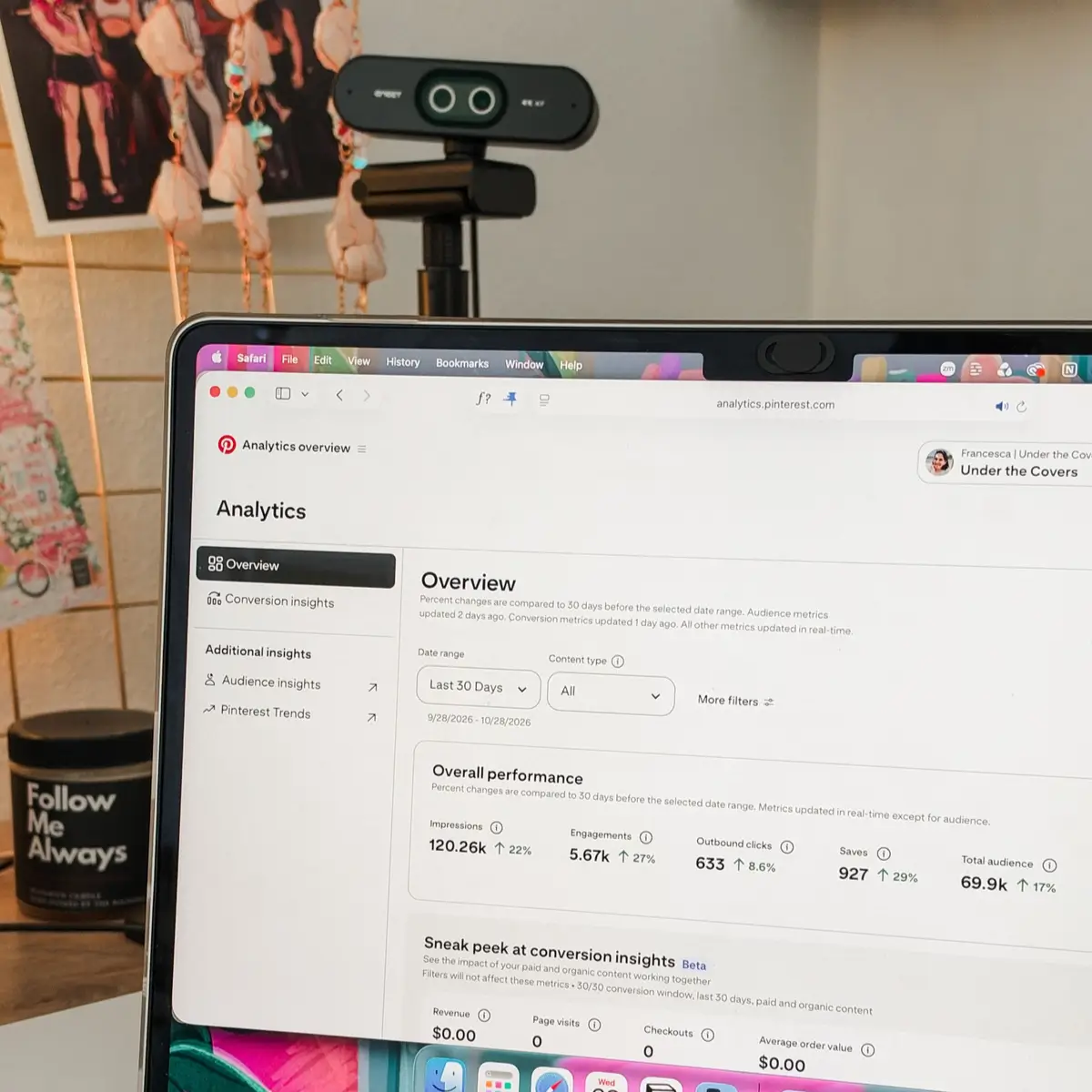
We’re seeing it in our own numbers. Francesca started posting on Pinterest more consistently in September, using only original pins (no duplicates) plus some video. Her monthly views and outbound clicks went up fast, and she isn’t pinning heavily, because she doesn’t have time to make that many pins. On Mediavine, Pinterest is now her third-highest RPM traffic source.
Victoria saw the reverse happen on Raptive. Pinterest traffic used to earn her lower RPMs, and now it’s in her top two. Raptive has also started letting you connect your Pinterest account so you can compare your Pinterest stats against your blog traffic in one place. When ad networks start paying more for Pinterest traffic and building tools around it, that tells you something about where readers are coming from.
Pinterest is still a rented audience, though. A lot of creators saw big traffic drops on Pinterest this year, and it has gone up and down the same way Google traffic has. So everything below comes back to one goal: get people from Pinterest onto your blog, and from your blog onto your email list.
What Pinterest rewards now
A focused account
The home feed draws on a long history of what each person engages with. The steadier and clearer your account is about what it covers, the easier it is for Pinterest to understand who to show you to. If you’re pinning journaling one day, recipes the next and fashion after that, Pinterest has a harder time placing you.
The simplest fix is to make your brand pillars your boards. If you worked through the Fix Your Brand Challenge, you already have them. Name each board the way someone would search for it. A board called “Quick Weeknight Dinners” can be found. A board called “Yum” can’t, even if the pins inside are identical.
Victoria has been archiving and merging boards to tighten her account up, and that’s a good place to start if yours has drifted over the years.
Fresh pins, every time
A fresh pin is a brand-new image, even when it points to a blog post you’ve been sharing for five years. Pinterest spreads out near-identical pins, and pinning the same graphic over and over makes your account look spammy. A refreshed version of your old graphic doesn’t count. Make something new.
This is easier when your content is tied to your real life. If you blog about coffee, every cup you make is a new photo. A different mug, a different room, a different morning outside. Same topic, new image.

Saves and outbound clicks do different jobs
Saves are carrying more weight right now. A save keeps your pin circulating, and an outbound click sends someone to your blog. You want both, which means making some pins people will save for later and some that make them want to click right away.
Some pins can hold all the information right on the image, like a checklist or a quick reference. Those tend to get saved more than clicked, and that’s fine. We’d still add a link to every one of them, because you never know who will want the next step.
Real photos
Pinterest now labels images it detects as AI-modified, and users can choose not to see them. If your pins rely on AI images, you’re shrinking your own audience, and the rules are only getting stricter. Use the photos already in your camera roll: your desk, your shelf, your kitchen, your coffee.
They don’t always have to match the topic exactly, either. Victoria has been using real photos of the sky, flowers, a donut, whatever she has, as backgrounds for text, and it has been working for her.
Video for reach, images for clicks
Pinterest hasn’t confirmed this, but what Francesca has seen on her own account, and what creators keep reporting in the Pinterest community forums, is that video pins get more reach and image pins get more outbound clicks. Reach still helps your whole account, so add some video to your mix. Give every video pin a link, a title, a description and alt text anyway.

How many pins should you post?
Tailwind’s guidance for bloggers is one to three fresh pins a day. Our advice is to pick a pace you can keep for months. One pin a day for a whole year will do more for you than three a day for two months before you burn out. Victoria knows that trap well.
Francesca is pinning about one a day right now, mixing pins for new posts with pins for older ones so she always has something to post.
Two rules we stick to:
- Never post two pins to the same link on the same day. That’s the quickest way to get marked as spam, and once that happens your reach gets throttled.
- Space pins for the same post at least a week apart. That’s what we do, and it’s something to test for your own account.
Then give it a year. Topics trend on Pinterest at different times, so a pin that’s quiet right now may just be early. Compare month over month and year over year, and that goes for evergreen posts too.
Which Pinterest numbers to watch
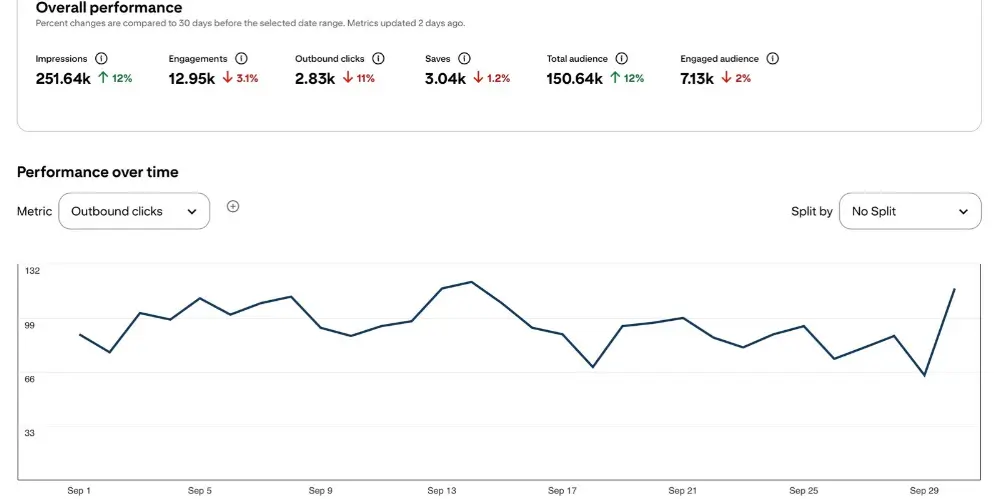
Judge each pin by the job you made it for. Pinterest’s analytics dashboard lets you sort pins by impressions, saves, pin clicks and outbound clicks, and each of those tells you something different:
- High impressions, low outbound clicks: the topic is good, and the pin isn’t convincing people to click. Change the title and description first, give it 30 to 90 days, and if nothing moves, redesign the pin using the same angle.
- Low impressions: the pin itself isn’t landing.
- Lots of saves, few clicks: if it was meant to be saved, it’s doing its job.
Pinterest only keeps detailed pin-level data for a limited window, so export your reports every so often if you want the history.
To see whether Pinterest is growing your email list, give the pins that point to your lead magnet their own tracking link. That can be a UTM link you check in Google Analytics, or a short link from a tool like short.io (which Francesca uses). Another option is a copy of your signup form or landing page used only for Pinterest, so every signup on it came from a pin.
Traffic dropped? Don’t start over
If your impressions crashed this year, you’re in good company. Plenty of creators saw the same thing, and plenty have seen it come back up. Starting a brand-new account is rarely the answer unless you’re changing niches completely.
Clean up what you have instead. Archive boards and pins rather than deleting them, tighten your focus, and keep posting fresh pins. Accounts come back. Francesca once left a YouTube channel alone for three years, and it came back slowly to the point of being monetized again.
Where every pin should link
Every pin gets a link. Our default is somewhere free that people can get to right away: a blog post, a lead magnet, a landing page or a YouTube video. Lots of different pins can point to the same post, as long as each one has its own image, angle, title and description.
Then make sure the page delivers what the pin promised, and gives people a way onto your email list. Someone landing on a blog post and leaving again is gone, and you have no way to reach them next time. Someone on your list is yours.
How to schedule pins
You can schedule pins for free right inside Pinterest. It has fewer options, but it’s a fine place to start.
When you’re ready to get more serious, Tailwind is Francesca’s top pick. Pinterest has always been its main focus, and its scheduler gives you clear recommended time slots that are easy to move around. She only uses the scheduler and skips the extra features. Buffer is a cheaper alternative, and she uses it for video pins longer than about 30 seconds, since Tailwind’s video file limit won’t take them.
Can you make money from Pinterest?
Pinterest doesn’t pay you directly. It helps you earn through:
- Ad revenue, when pins send readers to a monetized blog
- Affiliate links. You can now connect your Amazon affiliate account and tag products right inside Pinterest.
- Your own products, with pins that lead to your sales page
- Your email list, which keeps earning long after the click
Most people sharing big Pinterest income numbers are doing affiliate marketing. That’s a valid strategy. For us, Pinterest supports the brand and drives traffic to the blog, and affiliate sales are a bonus when the post already has affiliate links in it. Decide where most of your income comes from and point your pins there.
Final thoughts
Pinterest is rewarding the same things we keep coming back to on every platform: a clear brand, real photos, consistency you can sustain, and content that leads people home to your blog.
If your boards feel scattered, start with your pillars. The free Fix Your Brand Challenge walks you through finding them, and they map straight onto your boards. And when you’re ready to make the pins, our guide to turning one blog post into six Pinterest pins walks through exactly how we do it.
FAQ: Pinterest for Bloggers
Yes. Most top Pinterest searches don’t name a brand, so small blogs have a real chance to show up, and ad networks like Mediavine and Raptive are paying more for Pinterest traffic. It is still a rented audience, so use it to send readers to your blog and email list.
Tailwind suggests one to three fresh pins a day. Pick the pace you can keep for months. One pin a day for a year will do more than three a day for a few weeks.
Yes, as long as every pin is new: a different image, angle, title and description. Never post two pins to the same link on the same day. We space them at least a week apart.
We don’t recommend it. Pinterest labels images it detects as AI-modified, and users can choose not to see them. Your own photos work better and won’t get filtered out.
Usually not. Many creators saw drops this year. Clean up your current account by archiving boards and pins, tighten your focus and keep posting fresh pins. Start over only if you’re changing niches completely.
Pin it for later